---
title: "Integrations with Analytics Platforms"
url: "https://help.productfruits.com/en/article/analytics-platforms-integrations"
language: "en"
last_updated: "2026-10-22T12:35:04.931Z"
---
# Integrations with Analytics Platforms
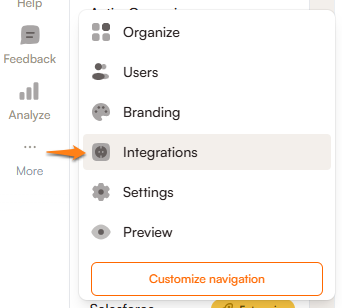
The `Integrations` tab can be found under the `More` button in the left-hand panel in the Product Fruits admin interface.
* * *
### How it works
Product Fruits tracks user events by default using its own built-in analytics. If you’d like to sync this data with your existing analytics platform, you can forward these events using built-in integrations or our JavaScript API. You can also listen to these events locally without forwarding them - perfect for custom workflows or logic.
* * *
### Platforms with built-in integrations
#### Bi-directional
- [Mixpanel](https://help.productfruits.com/en/article/mixpanel-integration) (see also [platform-specific notes](https://help.productfruits.com/en/article/analytics-platforms-integrations#mixpanel))
- [HubSpot](https://help.productfruits.com/en/article/hubspot-integration)
- [Segment](https://help.productfruits.com/en/article/segment-integration)
####
**From** Product Fruits only
- [ActiveCampaign](https://help.productfruits.com/en/article/activecampaign-integration)
- Customer.io
- Google Analytics (see [platform-specific notes](https://help.productfruits.com/en/article/analytics-platforms-integrations#google-analytics))
- Heap
- SessionStack
- [TypeForm](https://help.productfruits.com/en/article/typeform-integration)
### Integrations with other platforms
If you're using a different analytics platform not listed here, you can use our [**JavaScript API**](https://help.productfruits.com/en/article/javascript-api-analytics) or our [Zapier integration](https://help.productfruits.com/en/article/zapier-integration) to forward events to it.
* * *
## What we track — Sent events overview
The table below lists all available events and associated data fields that may be sent.
Please note that some platforms may not support all custom data fields listed.
- If you use one of our native integrations, the **Event name** will appear directly in your analytics platform.
- If you use our **JS API**, you’ll also receive the **Raw name** in the JavaScript object.
| Event name | Raw name | Data | Notes |
| --- | --- | --- | --- |
| Announcements Banner Action Consumed | announcements\_banner\_action\_consumed | id | v2 announcements |
| Announcements Banner Dismissed | announcements\_banner\_dismissed | id | v2 announcements |
| Announcements Banner Opened | announcements\_banner\_opened | id | v2 announcements |
| Announcements Newsfeed Item Consumed | announcements\_newsitem\_action\_consumed | id | v2 announcements |
| Announcements Popup Action Consumed | announcements\_popup\_action\_consumed | id | v2 announcements |
| Announcements Popup Dismissed | announcements\_popup\_dismissed | id | v2 announcements |
| Announcements Popup Opened | announcements\_popup\_opened | id | v2 announcements |
| Announcements Popups Stack Dismissed | announcements\_popup\_stack\_dimissed | ids | v2 announcements |
| Checklist dismissed | checklist\_dismissed | checklistId
checklistName | |
| Checklist completed | checklist\_done | checklistId
checklistName | |
| Hint dismissed forever | context\_help\_dismissed | containerId
cardId
cardName | |
| Hint open | context\_help\_loaded | containerId
cardId
cardName | |
| Feedback sent | feedback\_sent | videosCount
screenshotsCount | |
| Mood gathered | mood\_gathered | tourId
tourName
cardId
cardName
containerId
rating
tag | Sent when the user submits the adoption meter rating. Rating is sent as a number between 0 - 10. |
| Survey closed | survey\_closed | answersCount
questionId
additText
answer
surveyId
reason
sessionId | By default, only answersCount is included (number).
To track full answer data (array of question objects including questionId, additText, and answer), along with surveyId, reason, and sessionId, you need to manually track this event using productFruits.api.events.track(...) and include all of the properties you want to track. |
| Tour - Card step back | tour\_card\_back | tourId
tourName
cardId
cardName
currentCardOrder
cardOrderWithName | Sent when a user returns to the previous step |
| Tour - Custom button clicked | tour\_card\_button\_click | tourId
tourName
cardId
cardName
currentCardOrder
cardOrderWithName
buttonAction
buttonTitle
connectedTourId or url | |
| Tour - Card open | tour\_card\_loaded | tourId
tourName
cardId
cardName
currentCardOrder
cardOrderWithName | Sent when the card is rendered to the user. |
| Tour - Card read | tour\_card\_read | tourId
tourName
cardId
cardName
durationMs
durationS | Sent when the card is closed by the user. |
| Tour finished | tour\_finished | tourId
tourName
cardId
cardName | |
| Tour skipped | tour\_skipped | tourId
tourName
cardId
cardName | |
| Tour started | tour\_started | tourName
tourId
forced | |
| Tour started (Life Ring button) | tour\_started\_from\_button | tourId
tourName | Sent if the tour is started from the Life Ring button. The Tour started event is also sent. |
**Note:** All events also include a `'pfVendorName'` property set to `'Product Fruits'`.
* * *
### **Platform-specific notes**
#### **Mixpanel**
We use the `window.mixpanel.track` method to send events to Mixpanel.
Currently, multi-environment Mixpanel installations are not supported.
If Mixpanel is installed via NPM, please make sure to expose it globally:
```javascript
window.mixpanel = mixpanel;
```
* * *
####
**Google Analytics**
To ensure this integration functions correctly:
1. Google Analytics must be installed and tracking events in the application where Product Fruits is used.
2. In the `Integrations` tab in Product Fruits, click the `Activate` button in the `Google Analytics` tab.
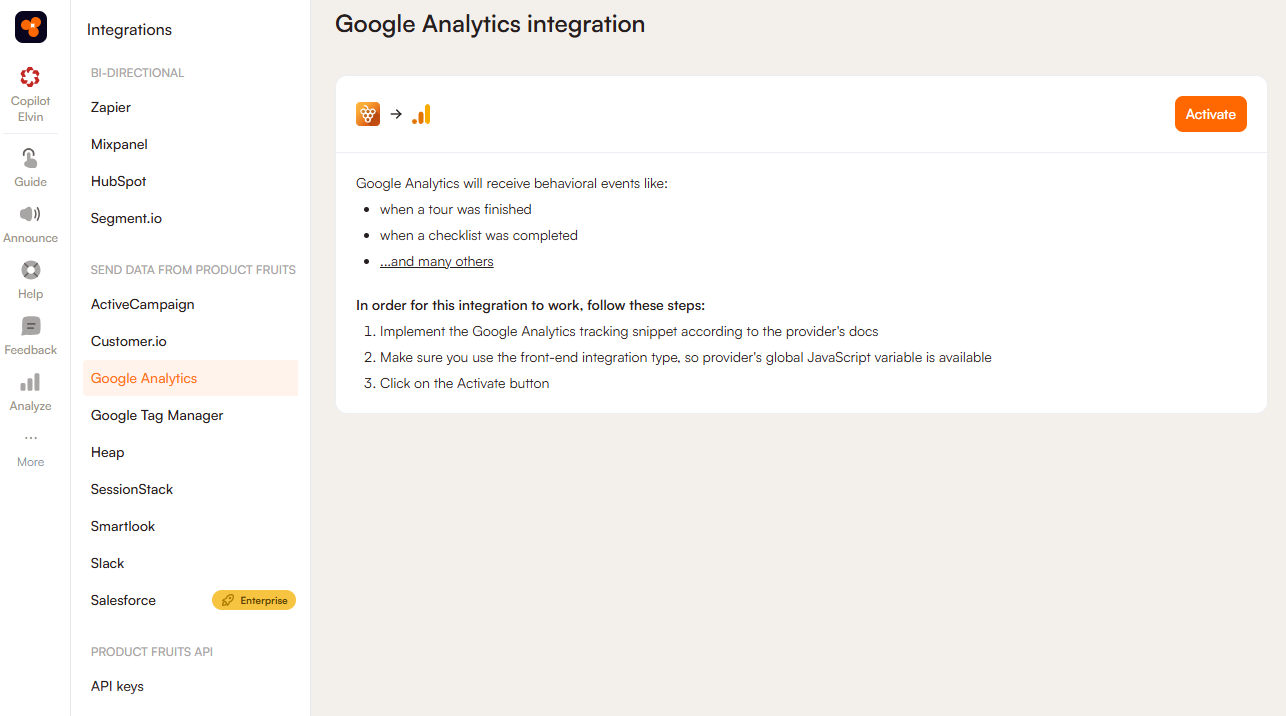
3. Verify that events are being forwarded properly using `Realtime reports` in your Google Analytics dashboard, or with `Tag Assistant`.
We use `window.ga('send', ...)` or `window.gtag('event', ...)` methods for this integration.
Named Google Analytics installations are not supported at this time.